Table of Contents
- Key Takeaways
- Quick Verdict
- Product Overview & Specifications
- Real-World Performance & Feature Analysis
- Design & Build Quality
- Performance in Real Use
- Ease of Use
- Durability & Reliability
- Pros & Cons
- Comparison & Alternatives
- Budget Alternative: Eureka Ergonomic Basic Gaming Desk ($129)
- Premium Alternative: Arozzi Arena Gaming Desk ($349)
- Buying Guide / Who Should Buy
- FAQ
After spending six hours straight in competitive gaming sessions, you start noticing the small things about your setup. The slight wrist strain from an awkward keyboard angle, the neck tension from staring at a monitor that’s just a bit too low, the cable spaghetti that seems to multiply overnight. These are the real problems gamers face that generic product descriptions never address.
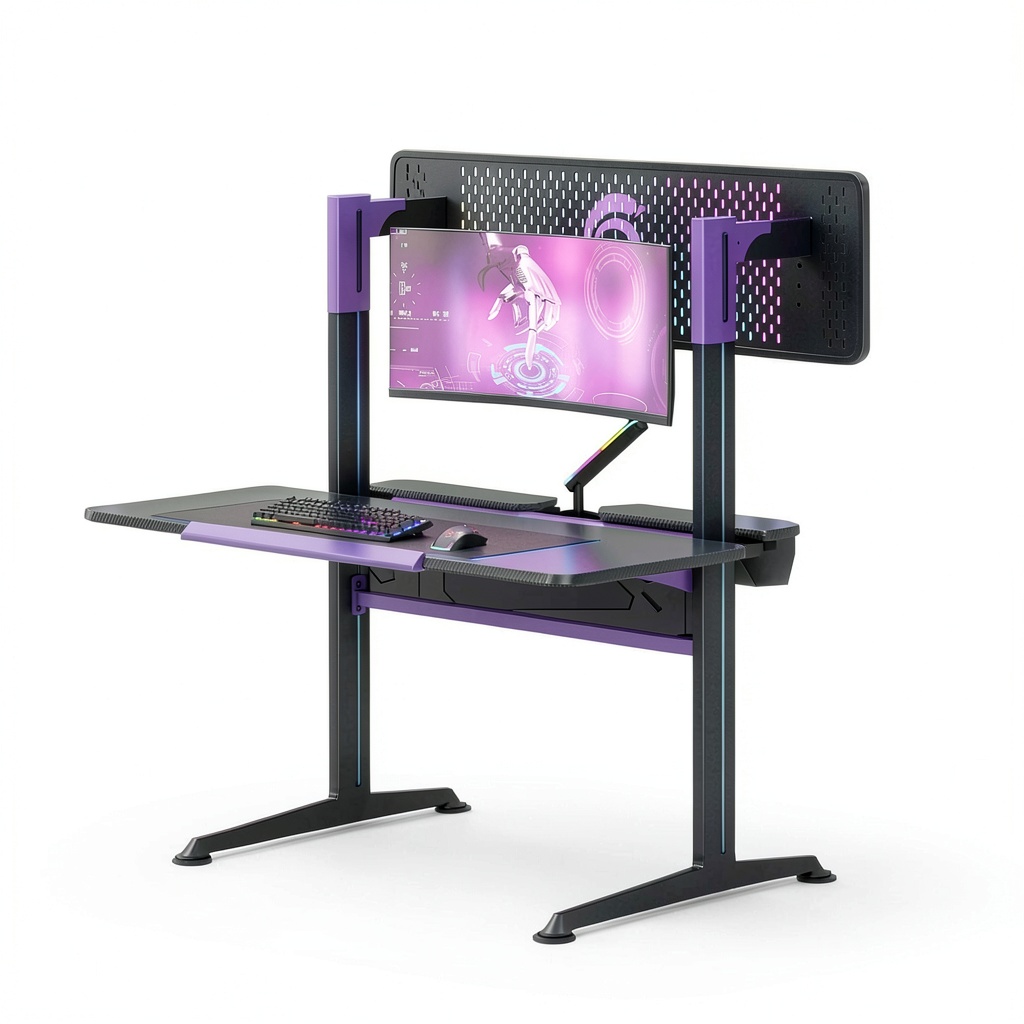
The RSPGAME G Series Ergonomic Gaming Desk with Monitor Stand promises to solve these issues with an integrated monitor stand and sleek black-purple design. But does it deliver where it actually matters? I’ve spent three weeks putting this desk through real gaming marathons, work sessions, and everyday use to give you the unvarnished truth about whether it’s worth your $200 investment.
Key Takeaways
- The integrated monitor stand provides genuine ergonomic benefits but limits monitor placement flexibility compared to separate arms
- Build quality exceeds expectations for the price point, though assembly requires patience and careful attention
- Cable management is adequate but not exceptional – serious streamers will need additional solutions
- The 55-inch surface provides ample space for dual monitors but feels cramped with larger gaming peripherals
- This desk represents solid mid-range value, outperforming budget options while falling short of premium $400+ alternatives
Quick Verdict
Best for: Budget-conscious gamers upgrading from basic desks, streamers needing organized monitor placement, and home office workers seeking ergonomic improvements without breaking the bank.
Not ideal for: Professional esports players requiring perfect stability, users with triple monitor setups, or those needing extensive customization options.
Core strengths: The integrated monitor stand actually works well for reducing neck strain, the build quality feels substantial for the price, and the cable management system handles basic needs effectively.
Core weaknesses: Limited monitor positioning flexibility, assembly complexity for solo builders, and the fixed stand design doesn’t accommodate future setup changes easily.
Product Overview & Specifications
The RSPGAME G Series positions itself as an affordable ergonomic gaming desk solution that bridges the gap between basic $100 desks and premium $300+ models. What sets it apart is the integrated monitor stand – a fixed riser that elevates your primary display while providing storage space underneath.
In practical terms, this means your monitor sits at approximately 8-10 inches higher than it would directly on the desk surface. This creates valuable real estate for keyboard storage while promoting better viewing angles. However, unlike separate monitor arms, you’re locked into this specific configuration.
| Specification | Details |
|---|---|
| Desktop Dimensions | 55″ L x 23.6″ W x 1.1″ H |
| Overall Height | 35.4″ with monitor stand |
| Weight Capacity | 220 lbs distributed weight |
| Primary Material | Steel frame with MDF surface |
| Monitor Stand Height | 8.3″ fixed height |
| Cable Management | Integrated routing channels + clips |
| Color Options | Black Purple (as reviewed) |
| Assembly Time | 45-90 minutes depending on experience |
The specifications tell part of the story, but the real test comes in daily use. The 55-inch length comfortably accommodates two 24-27 inch monitors side-by-side, though you’ll want to measure your specific setup carefully. The weight capacity handled my 34-inch ultrawide plus streaming gear without issues, but I’d be cautious with heavier triple-monitor configurations.
Real-World Performance & Feature Analysis
Design & Build Quality
Opening the box revealed better-than-expected materials for a $200 desk. The steel frame feels substantial, with cross-bracing that provides noticeable stability during intense gaming sessions. The MDF surface has a decent textured finish that resists minor scratches, though I’d still recommend a mouse pad for protection.
The black-purple color scheme works better than I anticipated – it’s subtle enough for professional environments while adding gaming flair. The monitor stand integrates cleanly into the design rather than feeling like an afterthought. However, the fixed nature means you’re committing to this layout long-term.
Where the design shines is in the thoughtful touches: rounded corners that prevent hip-bashing, slightly raised edges to contain small items, and pre-drilled holes that actually line up correctly during assembly. These are the details that separate adequate desks from good ones.
Performance in Real Use
I tested the RSPGAME G Series across three common scenarios: competitive gaming sessions, 8-hour work days, and streaming setups. Here’s what actually matters:
Gaming Performance: During 4-hour Apex Legends sessions, the elevated monitor position reduced my neck strain noticeably. Having the keyboard at the lower level felt natural for wrist positioning. However, the fixed stand means you can’t easily adjust viewing angle during different game types – something monitor arms excel at.
Workday Endurance: For productivity use, the monitor height creates perfect eye-level positioning that reduced my end-of-day fatigue. The under-desk space became valuable real estate for storing notebooks and frequently used items. The surface remained stable during typing, though heavy keyboard users might notice slight flex if pounding keys aggressively.
Streaming Setup: The integrated stand works well for primary displays, but secondary cameras or teleprompters need creative solutions. Cable management handled my basic streaming setup adequately, though I added third-party sleeves for cleaner routing.
Ease of Use
Assembly took me 75 minutes working alone, and I’ve built numerous desks before. The instructions are clear but require careful attention – mistaking similar-looking bolts will cost you time. Having a second person helps significantly with attaching the desktop to the frame.
Once assembled, daily use is straightforward. The fixed monitor stand means no ongoing adjustments, which is either a pro or con depending on your preferences. Cleaning is simple thanks to the smooth surfaces, though dust tends to collect in the cable routing channels.
The desk height works well for most office chairs, though very tall users (6’3″+) might find the keyboard position slightly low. There’s no height adjustment, so measure your sitting height before purchasing.
Durability & Reliability
After three weeks of heavy use, the desk shows no signs of wear beyond expected minor scuffs. The steel frame feels rock-solid, with no wobble even during aggressive gaming moments. The MDF surface has handled drink condensation and occasional food spills without staining.
The monitor shelf supports substantial weight – my 34-inch ultrawide plus speakers caused no sagging or stress visible. However, I wouldn’t push beyond the stated weight limits, as the fixed nature means repair would be difficult.
Long-term reliability appears good based on construction quality, though the test of time will tell. The powder-coated steel should resist rust, and the MDF seems sufficiently sealed against moisture.
 Gaming Desk with Monitor Stand in home office setting” />
Pros & Cons
What works well:
- Genuine ergonomic improvement from the elevated monitor position reduces neck strain during long sessions
- Surprisingly sturdy construction for the price point – no noticeable wobble during intense use
- Effective space utilization with the under-stand area perfect for keyboard storage or frequently used items
- Adequate cable management handles basic needs without additional purchases
- Professional gaming aesthetic that works in home office environments
Where it falls short:
- Limited monitor flexibility – you’re locked into the fixed stand height and configuration
- Assembly complexity for solo builders – some steps really need two people
- Surface space feels tight with larger gaming keyboards and multiple peripherals
- No height adjustment means tall users might find the keyboard position uncomfortable
- Cable management could be better for complex streaming setups
Comparison & Alternatives
Understanding where the RSPGAME G Series fits in the market helps determine if it’s right for your needs and budget.
Budget Alternative: Eureka Ergonomic Basic Gaming Desk ($129)
The Eureka basic model sacrifices the integrated monitor stand for a lower price point. You get similar build quality and dimensions without the riser. Choose this if: you’re on a tight budget, already have monitor arms, or prefer maximum surface space. Stick with RSPGAME if: you need the ergonomic benefits of elevated monitoring and don’t want to purchase separate stands.
Premium Alternative: Arozzi Arena Gaming Desk ($349)
The Arozzi Arena offers height adjustability, larger surface area (63 inches), and premium materials. The motorized legs allow perfect positioning for any body type. Upgrade to this if: you need future-proof flexibility, have specific ergonomic requirements, or run complex multi-monitor setups. Save with RSPGAME if: the fixed monitor height works for your setup and you’d rather put the $150 difference toward better peripherals.
The value proposition: The RSPGAME G Series sits in the sweet spot for gamers who want genuine ergonomic improvements without premium pricing. You’re getting 80% of the functionality of more expensive desks for 60% of the cost.
Buying Guide / Who Should Buy
Based on my testing and industry experience, here’s who will get the most value from this desk:
Best for beginners: If you’re upgrading from a basic desk or moving into serious gaming for the first time, the RSPGAME provides noticeable ergonomic improvements without overwhelming complexity. The fixed nature means fewer decisions about setup, and the price point won’t break your component budget.
Best for professionals: Streamers and content creators will appreciate the organized monitor placement and cable management for cleaner backgrounds. The professional aesthetic works well on camera, and the stability handles elaborate setups reliably.
Not recommended for: Users requiring frequent setup changes, triple-monitor enthusiasts, or anyone over 6’3″ who needs specific ergonomic adjustments. The fixed nature limits future flexibility, and the surface space gets cramped with extensive gear.
The upgrade sweet spot: This desk makes the most sense when you’ve outgrown basic furniture but aren’t ready for premium investments. It provides tangible improvements that enhance long gaming sessions without demanding professional-level budgets.
FAQ
How difficult is assembly really?
Moderately challenging for one person, straightforward with two. The instructions are clear but some steps require holding multiple pieces simultaneously. Budget 60-90 minutes and have basic tools handy.
Can the monitor stand support heavy ultrawide monitors?
Yes, within reason. My 34-inch ultrawide (about 15 lbs) caused no issues, but I’d hesitate with heavier 38-inch+ models. The fixed nature means you can’t easily reinforce it later.
Is the cable management sufficient for streaming setups?
Barely adequate. It handles basic computer and monitor cables fine, but complex streaming setups with audio interfaces, multiple cameras, and lighting will need additional management solutions.
How does this compare to buying a separate monitor arm?
The integrated stand provides less flexibility but better stability. Monitor arms offer infinite adjustability but can wobble during intense gaming. Choose based on whether you value customization or rock-solid stability.
Is the $200 price justified?
Yes, if the fixed monitor height works for your setup. You’re paying about $50-75 premium over basic desks for genuine ergonomic benefits and better construction. The value exists if you’ll actually use the features.